


Full Quran Audio MP3 Offline
4.615.00 Reviews
App Specs
- Version
- 5.6
- Updated On
- License
- Free
- Downloads
- 1,000,000+
- Developer
- AppSoNix
- Categories
- Libraries & Demo
- Platform
- Android
Screenshots




 Analysis by AppCompare
When I use a Quran app, I want it to fit quietly into the day: easy to open for a short reading, practical when I have time to listen, and not dependent on a perfect connection at every moment. Full Quran Audio MP3 Offline, from AppSoNix, is built around listening to and reading the Quran, with understanding as part of its purpose. Its appeal is straightforward, but the important question is how well that simple focus fits your routine—and how much you need to rely on network access.
Listening and reading around a changing connection
I find it useful to think of listening and reading as two parts of one routine, rather than expecting either to cover every situation. A little planning before leaving a reliable connection can make an interrupted or offline session less distracting; next, I’ll look at how that preparation fits into everyday mobile use.
What the app is trying to make easy
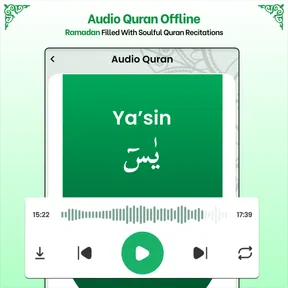
This is a Quran-focused app in the libraries and reference-style space, rather than a general audio player or a broad religious resource. I see its strongest use as keeping recitation and Quran reading close at hand without having to assemble a routine from several unrelated apps. If you often move between listening and following the text, that focused approach is more useful than opening a music player for audio and a separate reference app for reading.
The app’s short description emphasizes full Quran audio, while its broader purpose also includes reading and understanding. That combination matters: audio can make it easier to return to a passage while walking or doing a quiet task, and text is more practical when you want to pause and concentrate. I would treat it as a companion for personal study and regular listening, not assume that it replaces every specialist tool a reader might want.
Network access changes the first-use experience
Connectivity is the first practical detail I would pay attention to. The app is presented as supporting offline audio, which is valuable for commutes, travel, or places with unreliable reception. Even so, I would not assume that every part of the app is immediately available offline simply because audio can be used that way. Before relying on it away from Wi-Fi, open the app while connected and check that the listening material you need is ready for your intended use.
That small preparation step can prevent an avoidable frustration. A person heading out for a long trip should not wait until the train enters a tunnel to discover that a needed item still depends on a connection. If you are new to the app, spend a few minutes exploring its listening and reading areas at home. That gives you a clearer sense of what you can reach quickly and what may need internet access.
The app is free to install, though it also offers in-app purchases priced from $1.99 to $10.99 per item. I would start with the free experience and decide whether any paid option solves a specific need before spending. For someone who only wants occasional Quran listening, there is little reason to buy anything before understanding how the basic routine feels.
Worth Reading Before You Choose

Baby Panda World Brings Quick Play to Modern Phones, but Its Game Library Feels Busy

ESPN’s Live Game View Makes Following Close Games Easier

QuizzLand Review: A Good Fit for Short Trivia Breaks, Not Every Player

Basketball Stars: Multiplayer Is Fast, but Can It Recover When Matches Go Wrong?

WEBTOON Turns Phone Updates Into a Better Reading Routine

Link to Windows Runs on Shared Habits, Not Social Feeds
Useful on the move, with a little planning
A realistic use case is a morning commute: I can begin listening before leaving home, then keep the phone away rather than repeatedly searching for a passage on a small screen. In that situation, advance preparation is more important than browsing while travelling. It is also a good fit for a quiet break when I want to listen rather than read, provided I have already made sure the relevant audio is accessible.
For a short reading session at home, the balance changes. I would use the text-focused side when I can give it attention, and switch to audio when my hands are busy or my eyes are tired. This is a simple but helpful distinction: audio is convenient for fitting recitation into an existing activity, while reading is better when I want to move slowly through the text. Neither mode should be treated as a substitute for the other if your goal is both listening and close study.
On a phone, interruptions are part of ordinary use. Calls, notifications, battery concerns, and changes in reception can all break a listening session. I would choose a stable moment to begin and avoid relying on a fragile connection for an important stretch of listening. If you are travelling, checking your battery and getting the session ready before departure is more reliable than trying to troubleshoot while on the move.
Recovering when a session is interrupted
When an app stops behaving as expected, I prefer a simple recovery routine over tapping around at random. First, check whether the interruption is caused by the network or by the app itself; if you are online, a brief connection problem may be the issue. If you are offline, return to the listening area and see whether the material you need is available in that state. Starting a fresh session after restoring a connection can be more effective than repeatedly reopening the same screen.
I also recommend testing the app in the conditions where you plan to use it. If you expect to listen during a commute, try a short session before you leave and then check whether it continues smoothly when reception changes. This is not a complicated setup, but it helps distinguish an app limitation from a local connection problem. It also gives you a chance to learn where the relevant controls are before you are in a hurry.
For a longer session, I would avoid making the phone’s network status the only thing I think about. Have the app open and the intended listening choice ready before you start, and keep a clear idea of what passage or section you want to return to. That habit is especially useful if you are interrupted and need to resume without spending time searching through screens again.
Keeping mobile data use deliberate
If you are careful about mobile data, the sensible approach is to use Wi-Fi when preparing for offline listening and then test access before disconnecting. This keeps the experience more predictable and avoids discovering a network dependency at the moment you want to listen. I would also make a habit of checking the app’s available content while connected rather than assuming the phone has everything ready just because the app is installed.
This matters most for people who share a limited data plan, travel often, or live with inconsistent coverage. For occasional use at home, connectivity is less of a concern; for daily listening outside, it becomes part of the routine. The app’s offline-audio focus is promising for that second group, but good preparation still makes the difference between a smooth session and a frustrating one.
Compared with a general-purpose audio player, a dedicated Quran app keeps the purpose clear and brings reading into the same experience. Compared with a web-based Quran resource, an installed app can be more convenient when you want to return to it quickly, especially if audio is already prepared for offline use. A specialist study tool may still be better for someone who needs a particular set of scholarly references or advanced text tools. I would choose based on whether listening and straightforward reading are the main priorities.
Who will appreciate it—and who may prefer another tool
I think this app makes most sense for someone who wants Quran audio and reading in one focused place, especially if they like listening during ordinary parts of the day. It may also suit a learner who wants to build a steady listening habit and then turn to the text during a more attentive session. The age rating is Everyone, so it is presented for a broad audience rather than a narrowly adult use case.
It is less suitable for a person who expects every part of a Quran study workflow to be available without preparation, or who needs a highly specialized research environment. If your main requirement is a very particular translation, commentary, or study interface, compare those details before settling on this app. Likewise, if you never listen to audio and only want a text reader, a simpler reading-first option may feel more direct.
AppSoNix has built an app with a clear central purpose, and its audience is substantial: it has more than a million installs and a 4.6 average from around twelve thousand ratings. It is currently at version 5.6 and was released on May 22, 2023. Those figures give useful context, but I would still judge it by whether its reading and listening flow suits your own habits.
My connectivity verdict
For me, the main strength of Full Quran Audio MP3 Offline is the combination of Quran listening and reading in a dedicated app, with offline audio as an important part of its appeal. The main trade-off is that offline use should be treated as something to prepare for, not something to assume without checking. Set up your intended listening before leaving a reliable connection, and the app is more likely to fit naturally into a commute, a quiet break, or a regular home routine.
I would recommend trying it if you want an uncomplicated Quran companion and value the option of listening away from a steady network. I would look elsewhere if your priority is an advanced study suite or if you want a tool that requires no advance thought about connectivity. Used with that distinction in mind, it offers a practical way to keep Quran audio and reading within reach without turning the experience into a complicated setup.
Pros
- Listen to Quran recitations without an internet connection.
- Audio format makes it convenient to listen while commuting or relaxing.
- Can support repeated listening for memorization and revision.
- Useful for listeners who prefer recitation to reading on a screen.
- A dedicated Quran audio app keeps recitations easy to access.
Cons
- Audio downloads can take up considerable storage space.
- Reciter and translation options may be limited.
- Audio-only playback may not suit users seeking detailed study tools.
- Recitation quality and available recordings can vary by surah.
- Background playback and offline access may depend on device settings.
FAQs for Full Quran Audio MP3 Offline
What is Full Quran Audio MP3 Offline?
Full Quran Audio MP3 Offline is an app designed for listening to Quran recitations, with audio files intended to be available without an internet connection. Its usefulness depends on the version you download: reciters, translations, playback controls, and other features can vary. Check the app listing and its screenshots before installing so you can confirm that it includes the recitation and options you want.
Can I listen to the Quran without an internet connection?
Offline listening is the app’s main draw, but downloaded audio may not be available immediately after installation. Some versions require an initial internet connection to download or prepare the tracks, and storage space is needed for the files. Before relying on offline playback, open the app while connected, check whether the audio is fully downloaded, and test a track with your connection turned off.
Does the app include the complete Quran and different reciters?
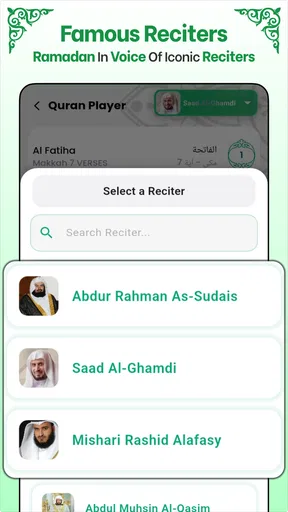
The title suggests Quran audio coverage, but the exact selection can differ between app versions. Check the listing or the in-app library for confirmation of all surahs, available reciters, and whether you can choose a particular reading style. If you need a specific reciter, Arabic text, or a translation alongside the audio, verify that feature before downloading rather than assuming it is included.
Is Full Quran Audio MP3 Offline free to download and use?
The app may be free to install, but that does not necessarily mean every feature is free or that the experience is ad-free. Depending on the version, it may display advertisements, offer optional purchases, or include other limitations. Review the store page for pricing and in-app purchase details, and check the developer’s privacy information if you want to understand what data the app may collect.
What should I check before downloading the app?
Confirm that the app is available for your device and operating system, and review its recent update date, permissions, user feedback, and storage requirements. Audio apps can need substantial space when tracks are saved for offline use. Also verify that the language, recitation options, and offline behavior suit your needs. Download from an official app store where possible, and avoid granting permissions that do not seem necessary for playback.


